Hello to everyone. I'm a new Gargoyle user.
Having previously used DD-WRT about 15 years ago, I recently decided it was time to try and get back into it, as I was using a 4G LTE MiFi type device in my house for many years.
After careful research I decided that a Netgear WNDR3700v5 that was offered for sale locally very cheap seemed like a good bet to get going with DD-WRT.
Unfortunately after purchasing the router, and flashing the latest build of DD-WRT for it, it was essentially bricked. It was stuck in a boot loop. It appears that due to lack of feedback and reporting from the DD-WRT community, they have been publishing builds "blind" for this router and somewhere along the line it got broken and nobody knew about it so it never got looked into.
Thankfully I was able to resurrect the router by flashing it with Gargoyle, and I am very impressed with the user experience so far.
I am happy to say that the installation of Gargoyle 1.14.0 was super easy with NMRPFLASH, and it has immediately satisfied 2 of my main goals. That is (1) It enables WiFi 5 (802.11ac) connectivity for this router, which is fantastic considering Netgear had limited it with their stock firmware. (2) Plugging in my BT70 (Alcatel/TCL rebadged MiFi LTE modem type device) into the USB port, I was able to use this as my internet connection straight away thanks to the built-in USB driver packages, one of which clearly supports the NDIS protocol that this device uses.
As happy as I am with what Gargoyle has given me so far, there are a couple more things that I would love to get working if possible.
The first is VPN. Nice as it is to see Wireguard and OpenVPN installed as part of the firmware, I'm in such a position where these are not going to be of any use to me. That's because I am using the LTE modem as my internet connection, and therefore I'm behind Carrier Grade NAT (CGNAT) and have no public IP address for incoming connections.
Doing plenty of research, I have come to the conclusion that TAILSCALE is the solution that will help me to overcome this problem. There is quite a lot of information out there about installing it on various devices. So far I have managed to install it on a Windows laptop and an Android mobile phone, and those 2 devices can reach eachother just fine, only there is no internet when TAILSCALE is engaged, because there is no Exit Node set up. I would like to use my Netgear WNDR3700v5 router with Gargoyle installed as the Exit Node for Tailscale. Sadly this is proving difficult for me, and I could really use some help from someone more knowledgeable than myself.
I have managed to gain SSH access to the router through Windows PowerShell, but some of the commands that guides I am ready tell me to put in are not recognised by the system so I'm kind of stuck. Perhaps Powershell is not what I should be using. Maybe I need Putty instead? At one point it said there was not enough space to install the package, but to be honest (I am familiar with DOS but haven't used used Linux before) I was not sure where I was trying to install it to. I am aware this router only has 16MB of flash memory. Perhaps I need to free up more space by uninstalling something that it no use to me such as Wireguard or OpenVPN if that is even possible (the pre-installed plugins don't allow uninstallation through the GUI it seems).
I'm also not clear on whether I should be staying with Gargoyle 1.14.0 or trying to move to a newer build. Is there any benefit in trying? 1.14.0 certainly seems stable so far and I don't want to upset that just for the sake of it.
Lastly, I can't work out how to get to the configuration page of my LTE device via the router. I can still get to it if I connect a device to the SSID of the LTE device itself and go to 192.168.1.1, but ideally I would like to turn the radio off on that device and just have my Gargoyle router SSID be used for everything. It's not a major problem as there is not much in the LTE device to configure, but I occasionally need to go in there to clear out SMS messages.
To recap, I'm mega impressed with Gargoyle and what it has enabled me to do so far, but would really appreciate a little help in getting these other little bits sorted out. Mega thanks to the developers of Gargoyle and thanks in advance to anyone who can help me install tailscale on my router.
Help installing Tailscale
Moderator: Moderators
Re: Help installing Tailscale
Glad Gargoyle is meeting some of your requirements 
On Tailscale, unfortunately I have zero experience. I've never had a need to learn anything about it.
Everything you need to know is here: https://openwrt.org/docs/guide-user/ser ... cale/start
First thing I looked up was the size of the package, at almost 10MB it is highly unlikely it will fit onto your remaining flash storage. You need to expand your storage via USB.
If you've only got the 1 USB port and that is already being occupied by your LTE stick you're a bit stuck. You could try a hub? But that might cause random issues.
Otherwise you could attempt to compile your own version of Gargoyle and remove OpenVPN and Wireguard if you don't need them. That will save you a little space.
You can uninstall default packages (via the GUI) but you will not gain back any space (in fact you will lose more space). That's the way overlayfs works.
I would recommend you install the latest 1.15.x beta and see if you get any more space back on your device. I'd expect an extra 0.5-0.8MB back. This might still be insufficient however.
On Tailscale, unfortunately I have zero experience. I've never had a need to learn anything about it.
Everything you need to know is here: https://openwrt.org/docs/guide-user/ser ... cale/start
First thing I looked up was the size of the package, at almost 10MB it is highly unlikely it will fit onto your remaining flash storage. You need to expand your storage via USB.
If you've only got the 1 USB port and that is already being occupied by your LTE stick you're a bit stuck. You could try a hub? But that might cause random issues.
Otherwise you could attempt to compile your own version of Gargoyle and remove OpenVPN and Wireguard if you don't need them. That will save you a little space.
You can uninstall default packages (via the GUI) but you will not gain back any space (in fact you will lose more space). That's the way overlayfs works.
I would recommend you install the latest 1.15.x beta and see if you get any more space back on your device. I'd expect an extra 0.5-0.8MB back. This might still be insufficient however.
https://lantisproject.com/downloads/gargoylebuilds for the latest releases
Please be respectful when posting. I do this in my free time on a volunteer basis.
https://lantisproject.com/blog
Please be respectful when posting. I do this in my free time on a volunteer basis.
https://lantisproject.com/blog
Re: Help installing Tailscale
Hi Lantis,
Thank you for the personal response. And thank you for all the effort you have put into Gargoyle which is certainly a great creation.
I will take your advice and try upgrading to 1.15, but will have to wait until family are not using the network. Can I preserve settings from 1.14?
Also with 1.15 what is the difference between the initramfs-kernel.bin and the squashfs-sysupgrade.bin files available for download (apart from the latter being more than double the size)?
The lack of flash memory is a concern for sure. Thanks for explaining that uninstallation of packages via the GUI will not free up any more space. That has certainly saved me wasting time on that. The logical question to come after that is whether packages can be uninstalled via the shell and whether or not that frees up space.
I'm sure I found a post somewhere on a different forum about someone who used a USB stick to install Tailscale onto for the same reason (lack of flash memory) and was then able to use a file transfer program (WinSCP which I have downloaded and installed and can see all the files on the router through it) to move over only the absolutely required files to run Tailscale to the router allowing the USB port to be freed up for the internet connection. I don't know if this could be an option or not.
I like the idea of a shrunken down compilation excluding the things that I won't use, but I have no idea how to compile anything and am totally new to Linux, so I don't see that being possible right now.
I'm also not understanding what the "Plugin Root:/plugin_root
Root Drive 1.938 MBytes Total, 1.625 MBytes Free " means in the Gargoyle GUI Plugins page, and how this relates to free space on the flash memory. Could anyone explain that please?
This is what I get when I try to check space in SSH:
Does anybody have any experience or views on the possibility of swapping the flash rom chip for one with more capacity? I am a competent solderer but don't normally work on IT equipment so have no idea whether or not you could just swap out an EEPROM chip for a bigger one and it will still work or not.
Thank you for the personal response. And thank you for all the effort you have put into Gargoyle which is certainly a great creation.
I will take your advice and try upgrading to 1.15, but will have to wait until family are not using the network. Can I preserve settings from 1.14?
Also with 1.15 what is the difference between the initramfs-kernel.bin and the squashfs-sysupgrade.bin files available for download (apart from the latter being more than double the size)?
The lack of flash memory is a concern for sure. Thanks for explaining that uninstallation of packages via the GUI will not free up any more space. That has certainly saved me wasting time on that. The logical question to come after that is whether packages can be uninstalled via the shell and whether or not that frees up space.
I'm sure I found a post somewhere on a different forum about someone who used a USB stick to install Tailscale onto for the same reason (lack of flash memory) and was then able to use a file transfer program (WinSCP which I have downloaded and installed and can see all the files on the router through it) to move over only the absolutely required files to run Tailscale to the router allowing the USB port to be freed up for the internet connection. I don't know if this could be an option or not.
I like the idea of a shrunken down compilation excluding the things that I won't use, but I have no idea how to compile anything and am totally new to Linux, so I don't see that being possible right now.
I'm also not understanding what the "Plugin Root:/plugin_root
Root Drive 1.938 MBytes Total, 1.625 MBytes Free " means in the Gargoyle GUI Plugins page, and how this relates to free space on the flash memory. Could anyone explain that please?
This is what I get when I try to check space in SSH:
Code: Select all
BusyBox v1.35.0 (2023-04-27 20:28:15 UTC) built-in shell (ash)

------------------------------------------------------------------
|            _____                             _                 |
|           |  __ \                           | |                |
|           | |  \/ __ _ _ __ __ _  ___  _   _| | ___            |
|           | | __ / _` | '__/ _` |/ _ \| | | | |/ _ \           |
|           | |_\ \ (_| | | | (_| | (_) | |_| | |  __/           |
|            \____/\__,_|_|  \__, |\___/ \__, |_|\___|           |
|                             __/ |       __/ |                  |
|                            |___/       |___/                   |
|                                                                |
|----------------------------------------------------------------|
| Gargoyle version 1.14.0   | OpenWrt 22.03 branch               |
| Gargoyle revision 97d7a844| OpenWrt commit 863f769             |
| Built May 19, 2023        | Target  ramips/mt7621              |
------------------------------------------------------------------
root@Gargoyle:~# df -h
Filesystem                Size      Used Available Use% Mounted on
/dev/root                11.0M     11.0M         0 100% /rom
tmpfs                    59.5M    116.0K     59.4M   0% /tmp
/dev/mtdblock6            1.9M    328.0K      1.6M  17% /overlay
overlayfs:/overlay        1.9M    328.0K      1.6M  17% /
tmpfs                   512.0K         0    512.0K   0% /dev
root@Gargoyle:~#
Last edited by se325919 on Sat Dec 06, 2025 7:19 pm, edited 6 times in total.
Re: Help installing Tailscale
You should not preserve settings between 1.14 and 1.15. They're a bit far apart with many core changes.
If there are certain things you wanted to keep (e.g. Static IP leases) I can assist in doing so manually. Take a backup first!
initramfs is required on some devices to bootstrap the OpenWrt flashing process. It is effectively an in-RAM only operating system from which you can then permanently flash proper OpenWrt/Gargoyle.
Some devices require it, most don't. If you are already on Gargoyle you should be able to ignore it.
The size difference is due to it not needing to be a full operating system occupying all of the flash layout, just enough to run in RAM.
GUI or shell uninstallation is all the same as far as saving space for preinstalled packages.
The base filesystem has these packages already included and they're in the read-only root filesystem.
The "overlayfs" runs over the top of this filesystem and effectively tracks changes.
So if you modify a base file, a whole new copy of it is written to the overlayfs with the changes. The OS knows to access the overlay first (that's all under the hood).
If you delete a base file, a "delete record" is written to the overlayfs, and while the file is "gone", it's still on disk taking up space, and a delete record now also exists so you've actually occupied more space (tiny amount) and gained none.
If you install a new file yourself and then remove it, you do gain back all of the space as they are not in the base file system.
You may be able to try that method with the USB but it's tricky with the symlinks that get written on the system to show that it is on the usb. A lot of manual cleanup. Not impossible just careful work required.
Looking again at the package, it looks like you have some config and init scripts (in /etc) and a binary in /usr/sbin. Not too hard to manage.
The other components are golang which probably has libraries that need to be grabbed. I've not touched golang either so can't advise. Pay close attention to what gets installed during the process and chase it down if needed.
To explain this:
- /dev/root (on /rom) is the root filesystem where everything is prepackaged in. It is 100% occupied and is not meant to be written to, that's where the overlayfs comes in
- overlayfs/overlay (on /) is the overlayfs which lets you "make changes" to the root system. This is your "free space" to play with. It started at 1.9MB and you've got 1.6MB left. These are the figures that Gargoyle show's in the GUI.
- tmpfs (on /tmp) is your RAM. While you can write files here they will not persist past a reboot
Why does root (11MB) and overlayfs (1.9MB) not add up to your 16MB of flash storage? There is other partitions that hold the bootloader, factory calibrations for the radios and mac addresses etc. There is also a little bit of unused space at the end of the flash chip.
Swapping the flash chips may not be physically challenging with your skillset, it 100% will require a compilation of the firmware and appropriate modifications to the device definition to take advantage of the additional space. If the chip is significantly different and not used on any of the other devices in the "family" then even further modifications must be made. Certainly not for the faint of heart.
If there are certain things you wanted to keep (e.g. Static IP leases) I can assist in doing so manually. Take a backup first!
initramfs is required on some devices to bootstrap the OpenWrt flashing process. It is effectively an in-RAM only operating system from which you can then permanently flash proper OpenWrt/Gargoyle.
Some devices require it, most don't. If you are already on Gargoyle you should be able to ignore it.
The size difference is due to it not needing to be a full operating system occupying all of the flash layout, just enough to run in RAM.
GUI or shell uninstallation is all the same as far as saving space for preinstalled packages.
The base filesystem has these packages already included and they're in the read-only root filesystem.
The "overlayfs" runs over the top of this filesystem and effectively tracks changes.
So if you modify a base file, a whole new copy of it is written to the overlayfs with the changes. The OS knows to access the overlay first (that's all under the hood).
If you delete a base file, a "delete record" is written to the overlayfs, and while the file is "gone", it's still on disk taking up space, and a delete record now also exists so you've actually occupied more space (tiny amount) and gained none.
If you install a new file yourself and then remove it, you do gain back all of the space as they are not in the base file system.
You may be able to try that method with the USB but it's tricky with the symlinks that get written on the system to show that it is on the usb. A lot of manual cleanup. Not impossible just careful work required.
Looking again at the package, it looks like you have some config and init scripts (in /etc) and a binary in /usr/sbin. Not too hard to manage.
The other components are golang which probably has libraries that need to be grabbed. I've not touched golang either so can't advise. Pay close attention to what gets installed during the process and chase it down if needed.
Code: Select all
root@Gargoyle:~# df -h
Filesystem                Size      Used Available Use% Mounted on
/dev/root                11.0M     11.0M         0 100% /rom
tmpfs                    59.5M    116.0K     59.4M   0% /tmp
/dev/mtdblock6            1.9M    328.0K      1.6M  17% /overlay
overlayfs:/overlay        1.9M    328.0K      1.6M  17% /
tmpfs 512.0K 0 512.0K 0% /dev- /dev/root (on /rom) is the root filesystem where everything is prepackaged in. It is 100% occupied and is not meant to be written to, that's where the overlayfs comes in
- overlayfs/overlay (on /) is the overlayfs which lets you "make changes" to the root system. This is your "free space" to play with. It started at 1.9MB and you've got 1.6MB left. These are the figures that Gargoyle show's in the GUI.
- tmpfs (on /tmp) is your RAM. While you can write files here they will not persist past a reboot
Why does root (11MB) and overlayfs (1.9MB) not add up to your 16MB of flash storage? There is other partitions that hold the bootloader, factory calibrations for the radios and mac addresses etc. There is also a little bit of unused space at the end of the flash chip.
Swapping the flash chips may not be physically challenging with your skillset, it 100% will require a compilation of the firmware and appropriate modifications to the device definition to take advantage of the additional space. If the chip is significantly different and not used on any of the other devices in the "family" then even further modifications must be made. Certainly not for the faint of heart.
https://lantisproject.com/downloads/gargoylebuilds for the latest releases
Please be respectful when posting. I do this in my free time on a volunteer basis.
https://lantisproject.com/blog
Please be respectful when posting. I do this in my free time on a volunteer basis.
https://lantisproject.com/blog
Re: Help installing Tailscale
Once again Lantis I salute you for your patience and kindness in helping this newcomer understand what he is dealing with. I will take some time to study your reply carefully and try to increase my knowledge and comfort navigating Linux file systems before deciding what to do next. It is something very different for me who has only used Windows and DOS in my lifetime. I really appreciate that you took the time to respond and explain things so clearly.
Re: Help installing Tailscale
You might find this OpenWrt Wiki article helpful. If I understand correctly, to get access to your modem's web interface you may need to change Gargoyle's LAN IP address to something other than the default 192.168.1.1 to "unmask" the modem's IP address of 192.168.1.1 - e.g. to 192.168.2.1.se325919 wrote: ↑Sat Dec 06, 2025 7:30 amLastly, I can't work out how to get to the configuration page of my LTE device via the router. I can still get to it if I connect a device to the SSID of the LTE device itself and go to 192.168.1.1, but ideally I would like to turn the radio off on that device and just have my Gargoyle router SSID be used for everything.
Re: Help installing Tailscale
Oh right, I forgot to address this part.pythonic wrote: ↑Sun Dec 07, 2025 4:45 amYou might find this OpenWrt Wiki article helpful. If I understand correctly, to get access to your modem's web interface you may need to change Gargoyle's LAN IP address to something other than the default 192.168.1.1 to "unmask" the modem's IP address of 192.168.1.1 - e.g. to 192.168.2.1.se325919 wrote: ↑Sat Dec 06, 2025 7:30 amLastly, I can't work out how to get to the configuration page of my LTE device via the router. I can still get to it if I connect a device to the SSID of the LTE device itself and go to 192.168.1.1, but ideally I would like to turn the radio off on that device and just have my Gargoyle router SSID be used for everything.
In Gargoyle 1.15.x under the Connection -> Advanced page you should be able to set this up easily too
https://lantisproject.com/downloads/gargoylebuilds for the latest releases
Please be respectful when posting. I do this in my free time on a volunteer basis.
https://lantisproject.com/blog
Please be respectful when posting. I do this in my free time on a volunteer basis.
https://lantisproject.com/blog
Re: Help installing Tailscale
Thank you Pythonic for directing me to that page. Some of that I had already found out from other sources, but there was certainly a lot of new stuff for me to learn from the OpenWRT page.
Default IP of my LTE modem is 192.168.1.1, and all devices on the Gargoyle network are on 192.168.137.xxx so that should be ok.
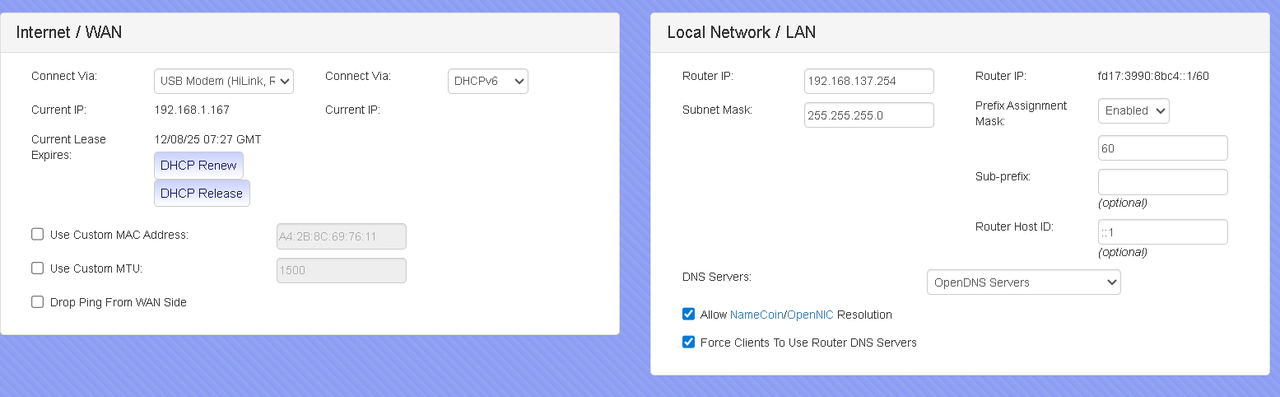
I suspect it might be something to do with the fact my LTE device is not just a dongle, its actually a mini router in itself. As well as the USB connection it can serve up to 8 devices on wifi, so it has a DHCP server built into it. There doesn't seem to be any way to turn that off. In fact I'm sure most people who have this device use it purely on wifi, as I have read the user manual cover to cover and it doesn't even mention the USB behaves as a network interface. The only thing it mentions about the USB port is that it is used to charge the internal battery. I only found out by chance that it even works as a network interface.
Currently while connected to the Gargoyle router on USB, it has served the Gargoyle router an IP address of 192.168.1.167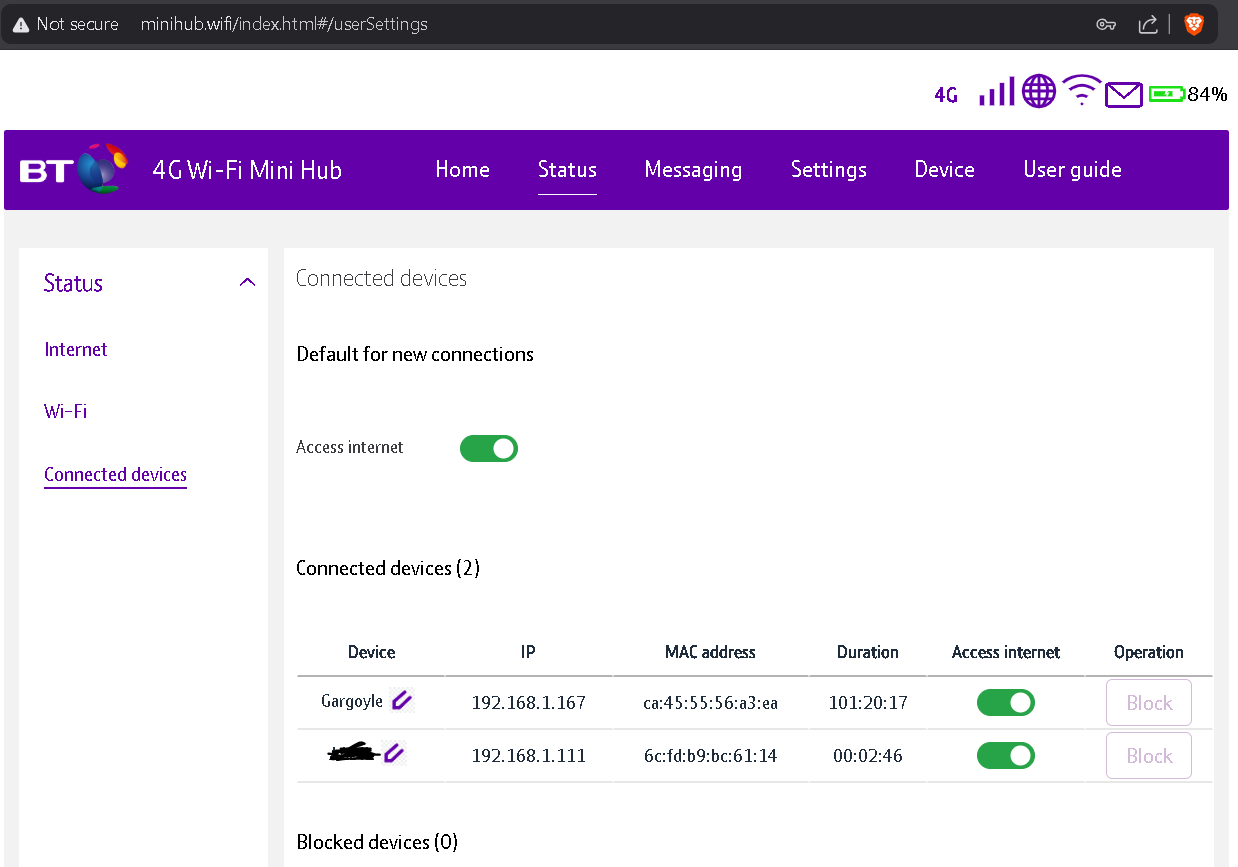
It reports its own connection to the internet to be 10.167.90.54, but this is a red herring as this is just an internal IP address on the mobile carrier's network, so is not useful.
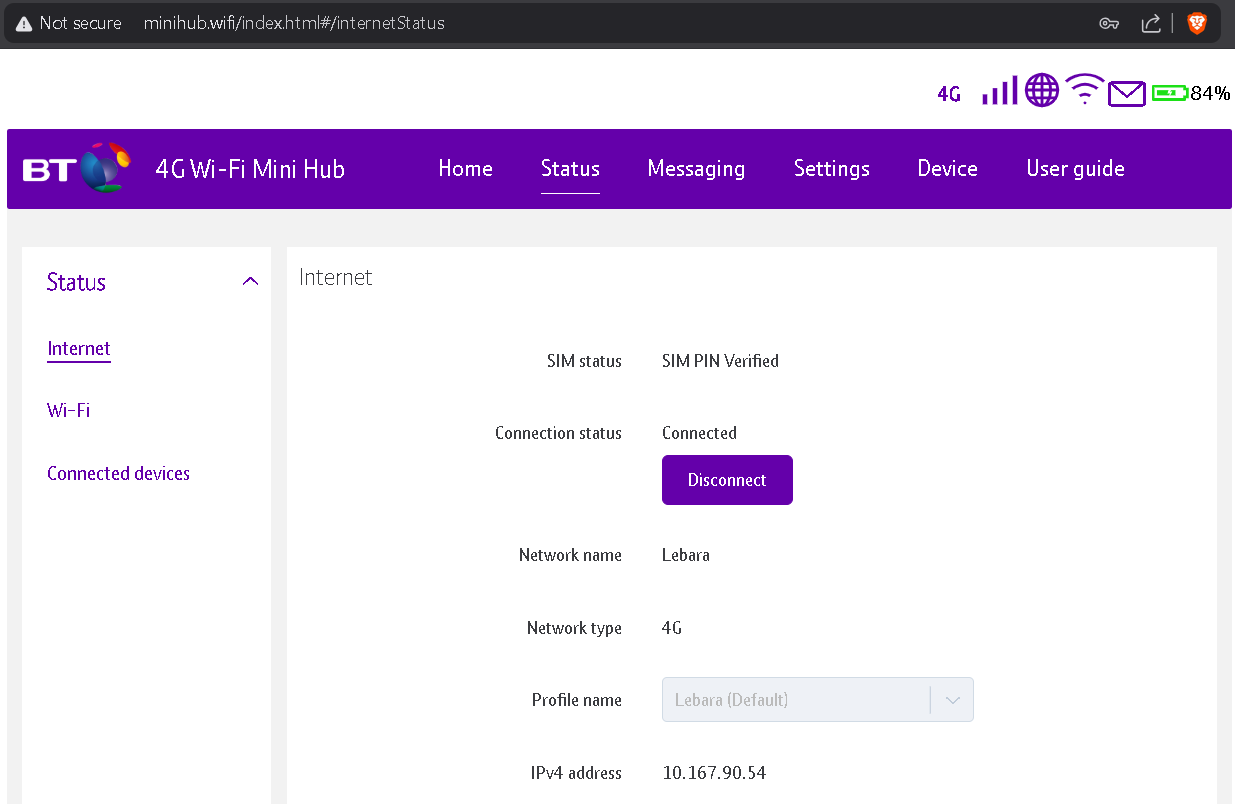
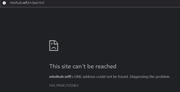
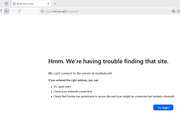
The above screenshots were got while connected to the SSID of the LTE device. When connecting from any device on the Gargoyle router network, entering 192.168.1.1 on the URL bar and pressing enter results in it resolving to http://minihub.wifi/index.html I am not sure where it is getting this hostname from. While it somehow gets the hostname, it seems unable to display the page. The message varies with each browser. Examples from Brave, Edge and Firefox here:

Anyway, this is a minor annoyance at this stage. I will reserve any other reporting until after upgrading to 1.15.
Back to the Tailscale issue. I suppose the most sensible next step before doing anything more drastic is to try and see if I can get it working on a USB stick first. The good news is that a USB hub seems to have no detrimental effect. The Gargoyle router seems happy accessing the LTE device AND a USB stick at the same time through a USB hub.
Lantis, thanks again for checking back and keeping an eye on my thread. Am I right in saying to upgrade to 1.15 I should use the squashfs-sysupgrade.bin file and not the initramfs-kernel.bin file?
When formatting the USB stick (it is a 2GB one), should I be ticking "Use Disk As External Root (Extroot)" or not? How should I divide the split between Swap and Storage?
Sorry again for all the questions.
Default IP of my LTE modem is 192.168.1.1, and all devices on the Gargoyle network are on 192.168.137.xxx so that should be ok.
I suspect it might be something to do with the fact my LTE device is not just a dongle, its actually a mini router in itself. As well as the USB connection it can serve up to 8 devices on wifi, so it has a DHCP server built into it. There doesn't seem to be any way to turn that off. In fact I'm sure most people who have this device use it purely on wifi, as I have read the user manual cover to cover and it doesn't even mention the USB behaves as a network interface. The only thing it mentions about the USB port is that it is used to charge the internal battery. I only found out by chance that it even works as a network interface.
Currently while connected to the Gargoyle router on USB, it has served the Gargoyle router an IP address of 192.168.1.167
It reports its own connection to the internet to be 10.167.90.54, but this is a red herring as this is just an internal IP address on the mobile carrier's network, so is not useful.
The above screenshots were got while connected to the SSID of the LTE device. When connecting from any device on the Gargoyle router network, entering 192.168.1.1 on the URL bar and pressing enter results in it resolving to http://minihub.wifi/index.html I am not sure where it is getting this hostname from. While it somehow gets the hostname, it seems unable to display the page. The message varies with each browser. Examples from Brave, Edge and Firefox here:
Anyway, this is a minor annoyance at this stage. I will reserve any other reporting until after upgrading to 1.15.
Back to the Tailscale issue. I suppose the most sensible next step before doing anything more drastic is to try and see if I can get it working on a USB stick first. The good news is that a USB hub seems to have no detrimental effect. The Gargoyle router seems happy accessing the LTE device AND a USB stick at the same time through a USB hub.
Lantis, thanks again for checking back and keeping an eye on my thread. Am I right in saying to upgrade to 1.15 I should use the squashfs-sysupgrade.bin file and not the initramfs-kernel.bin file?
When formatting the USB stick (it is a 2GB one), should I be ticking "Use Disk As External Root (Extroot)" or not? How should I divide the split between Swap and Storage?
Sorry again for all the questions.
Re: Help installing Tailscale
I wouldn’t do Extroot in your case. That effectively transfers the whole filesystem to the stick.
You just need a little extra space for some packages.
You just need a little extra space for some packages.
https://lantisproject.com/downloads/gargoylebuilds for the latest releases
Please be respectful when posting. I do this in my free time on a volunteer basis.
https://lantisproject.com/blog
Please be respectful when posting. I do this in my free time on a volunteer basis.
https://lantisproject.com/blog
Re: Help installing Tailscale
Nothing much more to report yet. Suecessfully upgraded to 1.15.X (Built 20250330-2253 git@ca9ca6a5). Was able to create a backup file and restore the settings from 1.14. All seems good and stable so far.
My USB is stick is not formatted in ext4 (it is FAT32). Does it need to be ext4?
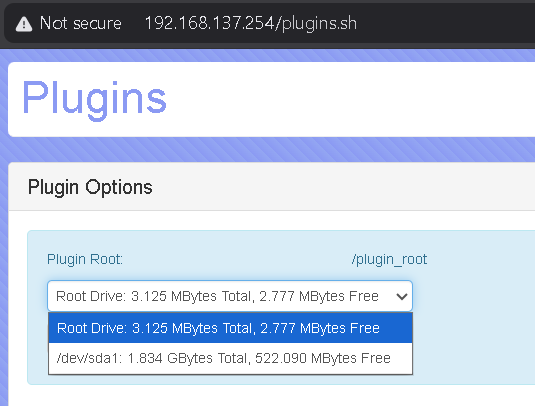
It seems to be detected on the Plugins page, but will changing the plugin root upset the pre-installed plugins?
My USB is stick is not formatted in ext4 (it is FAT32). Does it need to be ext4?
It seems to be detected on the Plugins page, but will changing the plugin root upset the pre-installed plugins?