Either format is ok.
Before you go too far down the config path though, you must not restore a 1.14 config onto 1.15. That’s basically the same as “preserving settings” and can lead to problems.
I would recommend a restore default configuration and then set up from scratch again.
Help installing Tailscale
Moderator: Moderators
Re: Help installing Tailscale
https://lantisproject.com/downloads/gargoylebuilds for the latest releases
Please be respectful when posting. I do this in my free time on a volunteer basis.
https://lantisproject.com/blog
Please be respectful when posting. I do this in my free time on a volunteer basis.
https://lantisproject.com/blog
Re: Help installing Tailscale
Thankyou Lantis. I did not know that. I am at work now, but will do as you say when I get a chance. It should not take me too long to set it up from scratch again as there was only a few DHCP reservations in there. I like the Gargoyle side menu with main headings broken down into sub pages for configuration. Very user-friendly and easy to find what you need. The pages themselves are pretty clear so you can easily understand what the settings do.Lantis wrote: ↑Tue Dec 09, 2025 4:56 amEither format is ok.
Before you go too far down the config path though, you must not restore a 1.14 config onto 1.15. That’s basically the same as “preserving settings” and can lead to problems.
I would recommend a restore default configuration and then set up from scratch again.
Re: Help installing Tailscale
Latest report.
As anyone following this thread will know, I have insufficient space to install Tailscale on the device itself, so will try to get it to install on a USB stick to see whether it will even work.
I plugged in a 2Gb USB stick which was formatted in FAT32. It had a few files on it but loads of free space. From the Plugins menu in the GUI I changed plug-in root to the USB stick. I then got a message that the format was not acceptable, and I would need to use the USB Storage page to format the stick in Ext4. I proceeded to do that, keeping the 25/75 split that was filled in by default. I was then able to change the plugin root back in the Plugins page.
Heading back to the PowerShell and SSH. I tried to install Tailscale using the first command shown on the OpenWRT guide page https://openwrt.org/docs/guide-user/ser ... =tailscale
But the result was still the same complaint about not enough free space. It appears that changing the plugin root in the GUI is not changing anything for the console, and I'm clueless how to specify where to install things from the console.
Can anyone advise this lost learner?
As anyone following this thread will know, I have insufficient space to install Tailscale on the device itself, so will try to get it to install on a USB stick to see whether it will even work.
I plugged in a 2Gb USB stick which was formatted in FAT32. It had a few files on it but loads of free space. From the Plugins menu in the GUI I changed plug-in root to the USB stick. I then got a message that the format was not acceptable, and I would need to use the USB Storage page to format the stick in Ext4. I proceeded to do that, keeping the 25/75 split that was filled in by default. I was then able to change the plugin root back in the Plugins page.
Heading back to the PowerShell and SSH. I tried to install Tailscale using the first command shown on the OpenWRT guide page https://openwrt.org/docs/guide-user/ser ... =tailscale
But the result was still the same complaint about not enough free space. It appears that changing the plugin root in the GUI is not changing anything for the console, and I'm clueless how to specify where to install things from the console.
Code: Select all
root@Gargoyle:~# opkg update
Downloading package list for openwrt_23.05-SNAPSHOT_routing source...
Package list for openwrt_23.05-SNAPSHOT_routing downloaded successfully.

Downloading package list for openwrt_23.05-SNAPSHOT_packages source...
Package list for openwrt_23.05-SNAPSHOT_packages downloaded successfully.

Downloading package list for gargoyle_kernel_specific source...
Package list for gargoyle_kernel_specific downloaded successfully.

Downloading package list for openwrt_23.05-SNAPSHOT_base source...
Package list for openwrt_23.05-SNAPSHOT_base downloaded successfully.

Downloading package list for openwrt_23.05-SNAPSHOT_telephony source...
Package list for openwrt_23.05-SNAPSHOT_telephony downloaded successfully.

Downloading package list for gargoyle source...
Package list for gargoyle downloaded successfully.


root@Gargoyle:~# opkg install tailscale
ERROR: Not enough space in destination root to install specified packages:
tailscaleRe: Help installing Tailscale
Do
/usr/lib/gargoyle/install_gargoyle_package.sh tailscale
/usr/lib/gargoyle/install_gargoyle_package.sh tailscale
https://lantisproject.com/downloads/gargoylebuilds for the latest releases
Please be respectful when posting. I do this in my free time on a volunteer basis.
https://lantisproject.com/blog
Please be respectful when posting. I do this in my free time on a volunteer basis.
https://lantisproject.com/blog
Re: Help installing Tailscale
Hi again Lantis. That's absolutely amazing. I have no idea the syntax of that command or how it works as I don't understand the linux file system or its folder structures. All I can say is a MASSIVE thanks to you, because it installed and worked. I can now use Tailscale to reach the router from outside, and to access other devices on the lan (those running Tailscale like Windows laptop, Android tablet AND those not running Tailscale such as my NAS). I can also specify the router to be the exit node.
At least I can say it is working for now. I have not tried rebooting the router yet. I suspect there will be more config necessary for it to persist and come back up after a reboot.
On another note, I have been studying the hardware in this router (Netgear WNDR3700v5). I took it apart to see how to get serial access to it as those over at DD-WRT need a look at the boot logs to see why their current build bricks the device. That will have to wait as I have ordered a RS232 to TTL adapter for my COM port and that will take some time to arrive. While looking inside though, I found some interesting things.
It would appear that the same PCB is used in several Netgear products (in fact it was made for Netgear by SerComm). The 16mb NOR flash memory in this particular one I have is replaced with 128MB NAND flash chips in the other models in the series. Sure enough, the pads for the NAND flash are there on the PCB. The other models also share the same FCC ID which more-or-less proves they are just derivatives of eachother. I have taken pictures and wonder whether I should add these here or create a new thread.
Re: Help installing Tailscale
I've been looking at tailscale as well
I think im going to go down the Nebula route instead
https://nebula.defined.net
OpenVPN is hub and spoke, if you loose your hub the network goes down
I think im going to go down the Nebula route instead
https://nebula.defined.net
Its effectly VPN meshNebula is an open-source overlay networking tool that is self-hosted, designed to be fast, secure, and scalable. It uses on-demand, encrypted tunnels to connect hosts across any IP networks without needing to open firewall ports, employing a PKI model for identity and authorization.
OpenVPN is hub and spoke, if you loose your hub the network goes down
Re: Help installing Tailscale
Greatse325919 wrote: ↑Sat Dec 13, 2025 12:23 pmHi again Lantis. That's absolutely amazing. I have no idea the syntax of that command or how it works as I don't understand the linux file system or its folder structures. All I can say is a MASSIVE thanks to you, because it installed and worked. I can now use Tailscale to reach the router from outside, and to access other devices on the lan (those running Tailscale like Windows laptop, Android tablet AND those not running Tailscale such as my NAS). I can also specify the router to be the exit node.
At least I can say it is working for now. I have not tried rebooting the router yet. I suspect there will be more config necessary for it to persist and come back up after a reboot.
On another note, I have been studying the hardware in this router (Netgear WNDR3700v5). I took it apart to see how to get serial access to it as those over at DD-WRT need a look at the boot logs to see why their current build bricks the device. That will have to wait as I have ordered a RS232 to TTL adapter for my COM port and that will take some time to arrive. While looking inside though, I found some interesting things.
It would appear that the same PCB is used in several Netgear products (in fact it was made for Netgear by SerComm). The 16mb NOR flash memory in this particular one I have is replaced with 128MB NAND flash chips in the other models in the series. Sure enough, the pads for the NAND flash are there on the PCB. The other models also share the same FCC ID which more-or-less proves they are just derivatives of eachother. I have taken pictures and wonder whether I should add these here or create a new thread.

That script is just a wrapper for “opkg install tailscale” but it adds the right parameters to find your new plugin root on the usb drive.
You’re welcome to post your findings. You will need to host the images elsewhere and link them here as the forum upload capacity has been full for a decade now

https://lantisproject.com/downloads/gargoylebuilds for the latest releases
Please be respectful when posting. I do this in my free time on a volunteer basis.
https://lantisproject.com/blog
Please be respectful when posting. I do this in my free time on a volunteer basis.
https://lantisproject.com/blog
Re: Help installing Tailscale
I'm back with a latest update. Not so good this time
Since installing Tailscale yesterday, the router became somewhat unstable. It seemed to be that when I connected through Tailscale from my Android mobile phone, I could happily access files on other devices on the network, but when I disconnected from Tailscale on that device, the router seemed to have a fit. It was as if it was doing a reboot. Lights on the front went off, connection to all wired devices was severed, Wireless networks were gone, until the power light on the router stopped flashing and all was normal again. This happened several times so I decided to stop using the Android and see what happened with a Windows PC. Connecting and disconnecting with the Windows PC did not seem to replicate the issue. However, later on the router did the same thing several times all of its own accord even with nothing connected through Tailscale. This got me thinking it may been nothing to do with the Android phone at all, and could just have been coincidence. Perhaps the router was doing that regardless. Point to note is that each time that reboot thing was happening, once it settled down Tailscale was still up and working. I gave it a cold reboot then, and the router came back on nicely BUT this time Tailscale is not running. It doesn't appear to be doing that reboot thing any more, but I am unable to start Tailscale again. I fully expected it not to start automatically after a reboot but thought I would be able to restart the service from SSH. However or indeed Tailscale anything just hangs the terminal window. If I try to install it again using the code supplied by Lantis a few posts back, it just reports that it is already installed.
There are a few things that I can think may be causing issues.
1. Maybe it doesn't like having Tailscale on a USB stick (I can't really do anything about this as I don't have enough storage on the chip)
2. Maybe it could be to do with the fact that there is a USB hub in the chain (I can't really do anything about this as my only internet connection comes from USB).
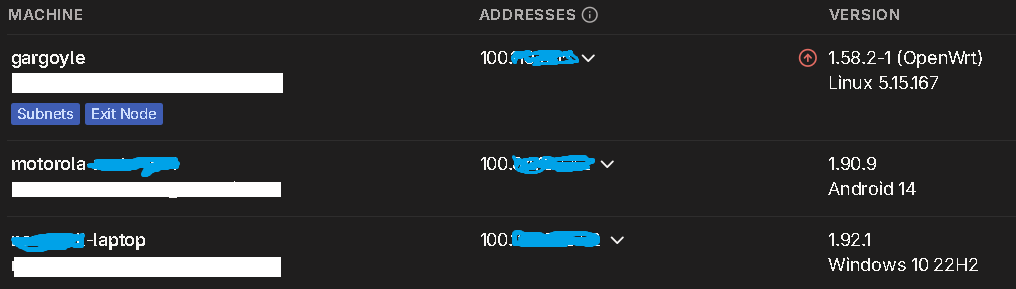
3. It could be the version of Tailscale that got installed. It seems to be a very old version which comes with the warning "Security update available
This machine is running a version with a known security vulnerability. It’s recommended to update to 1.92.1.". Unfortunately, the update instructions on the Tailscale website are not working for me.
Isypisail, Thanks for contributing. I would be most interested to know how you get on with Nebula. Do you have the same issue as me, being behind CGNAT? Do you have the same router as me? Please keep me updated on your progress.
Since installing Tailscale yesterday, the router became somewhat unstable. It seemed to be that when I connected through Tailscale from my Android mobile phone, I could happily access files on other devices on the network, but when I disconnected from Tailscale on that device, the router seemed to have a fit. It was as if it was doing a reboot. Lights on the front went off, connection to all wired devices was severed, Wireless networks were gone, until the power light on the router stopped flashing and all was normal again. This happened several times so I decided to stop using the Android and see what happened with a Windows PC. Connecting and disconnecting with the Windows PC did not seem to replicate the issue. However, later on the router did the same thing several times all of its own accord even with nothing connected through Tailscale. This got me thinking it may been nothing to do with the Android phone at all, and could just have been coincidence. Perhaps the router was doing that regardless. Point to note is that each time that reboot thing was happening, once it settled down Tailscale was still up and working. I gave it a cold reboot then, and the router came back on nicely BUT this time Tailscale is not running. It doesn't appear to be doing that reboot thing any more, but I am unable to start Tailscale again. I fully expected it not to start automatically after a reboot but thought I would be able to restart the service from SSH. However
Code: Select all
Tailscale upThere are a few things that I can think may be causing issues.
1. Maybe it doesn't like having Tailscale on a USB stick (I can't really do anything about this as I don't have enough storage on the chip)
2. Maybe it could be to do with the fact that there is a USB hub in the chain (I can't really do anything about this as my only internet connection comes from USB).
3. It could be the version of Tailscale that got installed. It seems to be a very old version which comes with the warning "Security update available
This machine is running a version with a known security vulnerability. It’s recommended to update to 1.92.1.". Unfortunately, the update instructions on the Tailscale website are not working for me.
Isypisail, Thanks for contributing. I would be most interested to know how you get on with Nebula. Do you have the same issue as me, being behind CGNAT? Do you have the same router as me? Please keep me updated on your progress.
Re: Help installing Tailscale
My Problem:
I need remote access to multiple Network Video Recorders (NVRs). Previously, I used OpenVPN, but found the maintenance burden too high—managing hub-and-spoke topology, configuring client devices, and handling router firmware upgrades became unsustainable.
I switched to simple port forwarding, which works externally but breaks when I'm on the local LAN. Split-horizon DNS solved the internal/external access issue, but now I have a security concern: my NVRs are directly exposed to the internet via port forwarding.
I'm researching alternative solutions that provide:
Reliable remote access to NVRs
Seamless internal/external connectivity (no split-brain issues)
Better security than direct port forwarding
Lower maintenance overhead than OpenVPN
I need remote access to multiple Network Video Recorders (NVRs). Previously, I used OpenVPN, but found the maintenance burden too high—managing hub-and-spoke topology, configuring client devices, and handling router firmware upgrades became unsustainable.
I switched to simple port forwarding, which works externally but breaks when I'm on the local LAN. Split-horizon DNS solved the internal/external access issue, but now I have a security concern: my NVRs are directly exposed to the internet via port forwarding.
I'm researching alternative solutions that provide:
Reliable remote access to NVRs
Seamless internal/external connectivity (no split-brain issues)
Better security than direct port forwarding
Lower maintenance overhead than OpenVPN
Re: Help installing Tailscale
Is it a passive USB hub or active (powered)?
I would suspect this as the first problem.
Does Gargoyle still recognise the external plugin root?
You can try “which tailscale” to see if it recognises the binary.
I would suspect this as the first problem.
Does Gargoyle still recognise the external plugin root?
You can try “which tailscale” to see if it recognises the binary.
https://lantisproject.com/downloads/gargoylebuilds for the latest releases
Please be respectful when posting. I do this in my free time on a volunteer basis.
https://lantisproject.com/blog
Please be respectful when posting. I do this in my free time on a volunteer basis.
https://lantisproject.com/blog